


Prisma Health GO
4.354.00 Reviews
App Specs
- Version
- 3.9.0
- Updated On
- License
- Free
- Downloads
- 100,000+
- Developer
- Prisma Health
- Categories
- Medical
- Platform
- Android
Screenshots
 Analysis by AppCompare
My first decision when considering Prisma Health GO would be whether I need help with hospital navigation or am actually looking for a full healthcare-management app. The name and the app’s medical category may suggest a broad patient portal, but its clearest practical role is helping people find their way around Prisma Health locations. That distinction matters: a map or turn-by-turn guide can solve the stressful “where do I go now?” problem, while appointments, records, and care conversations are separate tasks that should not be assumed to work the same way here.
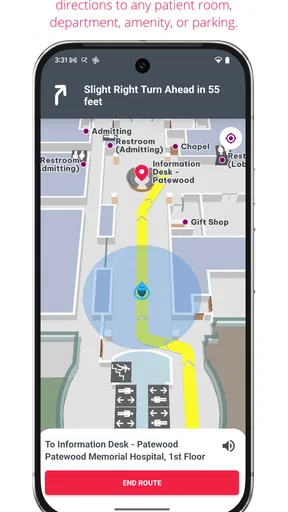
I would choose it for a visit where getting to the right building, entrance, or destination is part of the challenge, especially if I do not know the campus. Before setting out, I’d open the app, identify the destination I need, and give myself time to follow the directions rather than waiting until I was already late. A navigation tool is most useful when used before the pressure peaks; checking the route at home or while parked is a calmer way to plan than trying to interpret instructions while walking through an unfamiliar hospital.
What kind of help are you looking for?
Prisma Health GO is a free medical app from Prisma Health, and its focus makes it different from general health trackers and broad medical-reference apps. It is not a substitute for a clinician, and a navigation app cannot answer questions about symptoms or decide which care setting is appropriate. I see its value as practical and situational: it can reduce the wayfinding burden around a hospital visit, leaving more attention for the appointment itself.
That is a useful distinction for families and visitors, too. The person who knows the appointment details may not be the person driving, accompanying a patient, or trying to find the destination. If I were helping a relative, I’d check the location and route together before leaving, then keep the phone available for navigation instead of relying on a last-minute verbal description. For someone who already knows the campus well and rarely visits another location, the benefit may be modest.
Where the app can make a real difference
The strongest use case is a first visit to a large or unfamiliar hospital setting. A patient may be managing nerves, mobility concerns, paperwork, and a tight schedule all at once; reducing uncertainty about where to go is a small but meaningful help. I would especially consider it for an appointment where arriving at the correct destination matters more than simply reaching the general campus. The practical win is not that an app makes healthcare effortless, but that it can take one avoidable question out of the journey.
For example, imagine I am accompanying a family member to an appointment at a Prisma Health facility I have never visited. I would check the destination before leaving, review the route once we arrive, and avoid splitting up to search for signs while the patient waits. If the phone is being used by the driver, I would set up the route while safely parked. That simple preparation is more useful than trying to learn the interface under time pressure.
What it does not replace
For directions around a hospital, the usual alternatives are posted signs, asking staff, or using a general maps app to reach the campus. Each has a place. Signs and staff can be helpful once I am inside, while a general map is a familiar option for getting to an address. A hospital-focused navigation app is most compelling when the remaining challenge is finding the right destination after the broad route is already clear.
Worth Reading Before You Choose

EA SPORTS FC Mobile 26 Is a Bigger Football Game, but It Takes Time

Flipboard Shows What News Apps Must Do Beyond the Feed

Switching to Android Auto Means Rethinking Your Driving Routine

Google Calendar Makes a Crowded Week Easier to Manage

Ludo King Makes the Most of the Minutes Between Plans

Baby Panda World Brings Quick Play to Modern Phones, but Its Game Library Feels Busy
I would not treat it as the better choice in every situation. If I only need driving directions to a familiar entrance, my regular navigation app may be quicker. If I am already on site and cannot use my phone, asking staff or following signs is more sensible. And if my goal is managing appointments, reviewing records, or arranging a virtual consultation, I would first check which official Prisma Health service handles that particular task rather than expecting a wayfinding app to cover it.
Small preparations that reduce friction
A few habits can make a navigation app more useful without assuming anything about its individual controls. I’d confirm the facility and appointment destination from my visit information before starting, check that my phone has enough charge, and avoid entering directions while driving. If someone else is accompanying me, I’d agree on a meeting point in case we get separated. These are ordinary precautions, but they prevent a phone-based route from becoming one more source of stress.
It is also worth remembering that a hospital visit can involve changes: a destination may be updated, a patient may need assistance, or a route may be interrupted by a practical need. I would treat the app as guidance rather than as the final authority. If directions seem inconsistent with staff instructions or on-site signs, I would follow the people responsible for the facility and ask for clarification. Navigation supports the visit; it does not replace local guidance.
Who should install it—and who may not need it?
I’d recommend considering it if you expect to visit Prisma Health and want a dedicated way to navigate rather than relying entirely on memory or general maps. It may be particularly useful for a first-time visitor, someone accompanying a patient, or anyone who finds unfamiliar hospital layouts stressful. The app is free, rated for Everyone, and has an average rating of 4.2 from around 170 ratings, which gives prospective users some context without telling them whether it will fit their specific visit.
On the other hand, I would skip it if I have no reason to navigate Prisma Health locations, or if I only want a general-purpose map for everyday travel. It is also not the right tool for urgent medical advice: a navigation app should not delay contacting emergency services or a qualified professional when immediate care is needed. The best fit is narrower and clearer than “everyone who manages their health”—it is people who can benefit from help getting around Prisma Health.
Getting to Know Prisma Health GO
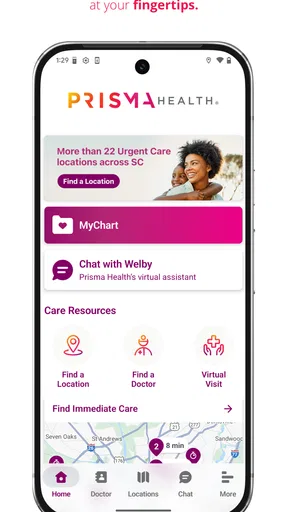
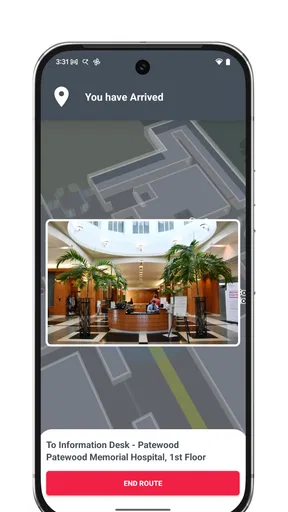
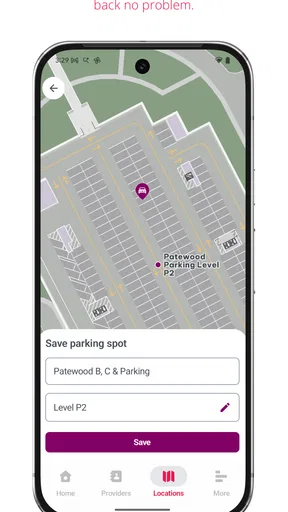
First things first, let’s dive into what this app is all about. It is designed to help people navigate Prisma Health locations, making the journey to a hospital destination easier to manage. That is a more grounded promise than expecting one app to handle every part of healthcare. For me, the useful question is whether hospital directions are a real need in my routine, not whether I want another icon on my phone.
User-Friendly Interface
One of the things I absolutely love about this app is its user-friendly interface. You don’t need a PhD in tech to navigate it. Everything is laid out in a way that’s intuitive and easy to follow. From the moment you open the app, you’re greeted with a clean and organized dashboard that puts all the essential functions at your fingertips.
Need to schedule an appointment? Just a few taps and you’re set. Want to check your lab results? They’re right there. It’s amazing how something so simple can save so much time and hassle. The app even sends you friendly little reminders so you never miss an appointment or a medication.
Virtual Visits: Healthcare on Your Terms
Let’s talk about the virtual visit feature – it’s a game-changer. We’ve all had those days when dragging ourselves to the doctor’s office feels like a marathon. With this app, you can have a consultation with your healthcare provider from the comfort of your couch. Trust me, your pajamas and couch will thank you.
Setting up a virtual visit is as easy as pie. Just choose the date and time that works for you, and you’re good to go. During the consultation, you can discuss your health concerns as if you were in the doctor’s office. It’s convenient, efficient, and perfect for our fast-paced lives.
Comprehensive Medical Records Access
Another standout feature is the comprehensive access to your medical records. Whether it’s your latest blood test or your vaccination history, it’s all there, neatly organized and easily accessible. This means no more rummaging through mountains of paperwork or trying to recall the last time you had that tetanus shot.
Plus, the app keeps everything secure, so you can rest easy knowing your personal information is protected. It’s like having a personal health assistant that never sleeps!
Integration and Notifications
Prisma Health GO also plays well with other apps. It syncs with your calendar to ensure you never miss a beat. And the notifications are a lifesaver. Whether it’s a gentle nudge to take your meds or a reminder about an upcoming appointment, these alerts keep you on track without being intrusive.
The integration capabilities mean you can seamlessly incorporate the app into your daily routine, making health management feel less like a chore and more like a natural part of your day.
Final Thoughts
In a world where time is precious and convenience is king, Prisma Health GO stands out as a useful option for people who need help navigating Prisma Health facilities. The app is free, developed by Prisma Health, and has been available since April 12, 2019. Its current version is 3.9.0, and it has passed 100,000 installs. Those details suggest that it has found an audience, but my recommendation still comes down to whether you expect to use its location-specific guidance.
If you’re tired of the old-school ways of finding your way around a hospital, give this app a look before your next visit. For a familiar destination, it may not add much; for an unfamiliar one, having directions ready can make arrival feel more manageable. I would keep it as a focused aid for getting around, while turning to the appropriate Prisma Health service or a healthcare professional for needs beyond navigation.
Pros
- User-friendly interface with intuitive navigation.
- Comprehensive health resources and guides.
- Easy appointment scheduling feature.
- Secure access to medical records.
- Real-time notifications for health updates.
Cons
- Limited language support options.
- Requires stable internet connection.
- Some features locked behind login.
- Occasional app performance lags.
- Limited customization for user preferences.
FAQs for Prisma Health GO
What is Prisma Health GO and how does it work?
Prisma Health GO is a comprehensive app designed to streamline healthcare management and access for users. It offers features like appointment scheduling, virtual visits, and access to medical records. Users can easily connect with healthcare providers, manage prescriptions, and receive notifications for upcoming appointments or health tips. The app is available on both Android and iOS platforms.
Is Prisma Health GO free to use, or are there any subscription costs?
Prisma Health GO is free to download and use for basic features such as checking medical records and scheduling appointments. However, some advanced features, like virtual consultations or specialized health programs, may require a subscription or a one-time fee. It's best to check the app for any in-app purchases or subscription details.
Can I access my family's health records through Prisma Health GO?
Yes, Prisma Health GO allows you to manage and access your family's health records, provided you have the necessary permissions. This feature is particularly useful for parents managing their children's health appointments and records, or caregivers monitoring the health of elderly relatives. Make sure to follow data privacy guidelines when accessing family records.
How secure is my personal health information on Prisma Health GO?
Prisma Health GO places a strong emphasis on the security of your personal health information. The app uses advanced encryption and follows industry-standard security protocols to protect data. Additionally, users are encouraged to set up strong passwords and enable two-factor authentication to enhance security. Always ensure your device is updated to the latest software to maintain security.
What should I do if I encounter technical issues with Prisma Health GO?
If you experience technical issues with Prisma Health GO, you can contact the app's customer support through the 'Help' section within the app. They provide troubleshooting guides and customer service contacts for further assistance. Additionally, you can check for updates in the app store, as new versions often fix bugs and improve performance.


